
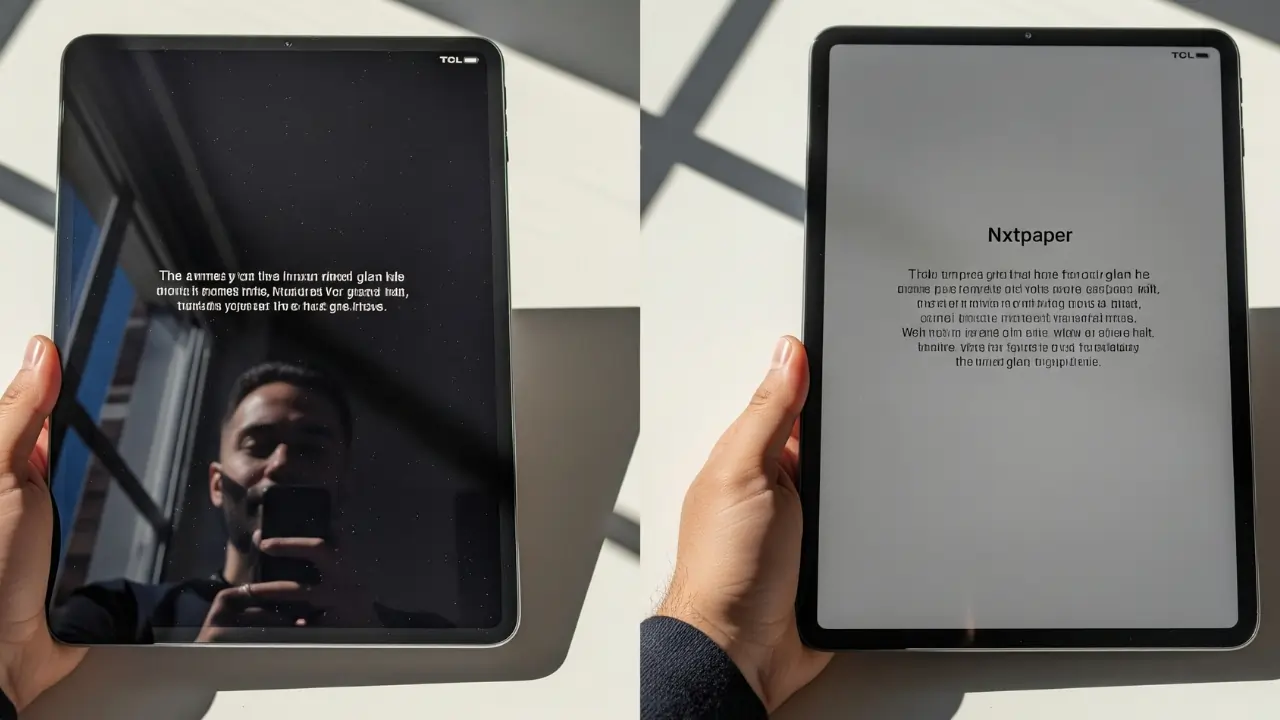
Let’s be honest, we all have a love-hate relationship with our screens. We work on laptops, scroll on phones, and binge-watch on tablets. By bedtime, our eyes feel like they’ve run a marathon on sandpaper. TCL thinks they have the answer with their new Nxtpaper 60 Ultra, and I’m cautiously optimistic.
Is This the Tablet That Finally Kills Eye Strain, or Just a Confused Experiment?
Every few months, a company announces a product that claims to solve all our problems. Usually, it’s marketing fluff. But TCL’s Nxtpaper technology has always been genuinely interesting to me. It’s not e-ink like your Kindle, but it’s not a standard glossy screen like your iPad either. It’s a hybrid designed for people who read a lot but still want a full-fledged Android tablet for YouTube and email.
With the newly announced Nxtpaper 60 Ultra, TCL isn’t just aiming for the reading niche anymore. They’ve packed this thing with high-end specs that compete directly with premium players. The question is, did they create the perfect all-in-one device, or did they miss the point entirely by making it too expensive and complicated?
The Real Problem: Why Your Kindle Sits Next to Your iPad
Think about your current setup. If you’re a heavy reader, student, or professional who goes through a lot of documents, you might own a Kindle. It’s fantastic for books because the e-ink screen doesn’t blast light into your face. But try browsing the web or watching a video on a Kindle. It’s a painful, laggy experience.
So, you also own a regular tablet—an iPad or a Samsung Galaxy Tab. It’s great for media consumption and productivity apps, but reading on that glossy screen for hours, especially at night or outdoors, leads to headaches and eye fatigue. We are constantly switching between devices because neither one does both jobs well. This is the exact problem TCL is trying to solve.
So, What Exactly is This Nxtpaper Magic?
TCL calls its latest screen tech “Nxtpaper 4.0.” Forget the version number. Here’s what it means for you in simple terms: it’s engineered to feel like paper. The screen has a special matte texture that drastically cuts down on reflections and glare. If you’ve ever tried using your tablet on a balcony or near a bright window, you know how annoying reflections can be. This new tech aims to eliminate that.
TCL claims it filters out harmful blue light at the hardware level without turning the entire screen a sickly yellow colour like most “night mode” filters do. For students in India spending hours poring over PDF notes for competitive exams, or professionals reading reports, this could be a massive quality-of-life improvement. It promises the comfort of e-ink but with full colour and a fast 120Hz refresh rate for smooth scrolling. On paper, it’s the dream screen.
Here’s Where TCL Confuses Me: The “Ultra” Specs
This is where I start to raise an eyebrow. When I think of a reading-focused device, I think of efficiency and affordability. But look at the spec sheet for the Nxtpaper 60 Ultra. TCL has included a MediaTek Dimensity 9300+ processor. This is a top-tier chip. It’s built for high-end gaming and heavy multitasking, not just reading books and browsing web pages.
Then there’s the camera system. A 50MP front camera is great for video calls. But a 50MP telephoto lens on the back? Who is taking zoom shots with a tablet? In my experience, tablet cameras are almost always an afterthought, used only for scanning documents. Putting such a high-end camera sensor here feels like feature creep. It’s a feature that looks great on a marketing poster but adds cost that a real user might not actually benefit from.
The 7.2-inch Screen: Genius Size or Awkward Middle Ground?
The screen dimensions are also unusual. It’s a 7.2-inch display with a 3:2 aspect ratio. A standard Kindle Paperwhite is about 6.8 inches, while most small tablets start at 8 inches and go up to 11 or 12. This 7.2-inch size sits in a weird no-man’s land.
I suspect the 3:2 aspect ratio (taller than standard widescreen) might be excellent for reading documents and websites, showing more vertical content. But is it too small for real productivity work, yet too bulky to be as portable as a dedicated e-reader? I can see it being great for comic books and magazines, but I’m not convinced it’s the perfect size for everyone.
Key Takeaways: The Good, The Bad, and The Confusing
- Pro: The Screen Technology is the Star: The primary reason to even consider this tablet is the Nxtpaper 4.0 display. If it delivers on its promise of significantly reduced eye strain while maintaining color accuracy, it could be a huge win for students and professionals.
- Con: Potential Price Shock in India: The announced price of $500 translates to roughly ₹42,000 before taxes and import duties. At this price point, you are competing directly with the Apple iPad Air and base Samsung Galaxy Tab S models, which have much stronger ecosystems and brand loyalty in India.
- Conundrum: Overkill Specifications: The high-end processor and telephoto camera feel unnecessary for a device marketed for reading comfort. This likely inflates the price, pushing it away from users who want a simple, affordable, eye-friendly tablet.
- Pro: Massive Battery Life: A 10,000 mAh battery combined with a potentially more efficient screen could mean multi-day battery life, which is a major convenience, especially for users who travel frequently or face inconsistent power supply.
The Big Question: Who Should Actually Buy This?
Let’s assume the Nxtpaper 60 Ultra launches in India for around ₹45,000. Who is the ideal customer?
It’s not for the casual user who just wants to watch Netflix. They can get a cheaper standard tablet. It’s probably not for the hardcore gamer, who would likely prefer a dedicated gaming phone or a more powerful traditional tablet with an OLED screen.
I believe the target user is very specific: the “power reader.” This is someone like a law student, a researcher, or an executive who must read for hours every day but hates the limitations of e-ink. If you fit this description and have the budget, this device could be exactly what you’ve been waiting for. For everyone else, the high price tag might make it difficult to justify over proven alternatives from Apple and Samsung.
Competitive Snapshot: Where Does the Nxtpaper 60 Ultra Fit?
| Feature | TCL Nxtpaper 60 Ultra (Expected) | Apple iPad (10th Gen) | Amazon Kindle Paperwhite |
| Primary Screen Feature | Paper-like matte finish, low eye strain | Glossy, high-resolution LCD | E-ink, no glare, black & white only |
| Best For | Heavy reading, document annotation, general use | Media consumption, creative apps, ecosystem | Dedicated book reading, extreme battery life |
| Weakness | Potentially lower color vibrancy than OLED, unproven brand value | Screen glare, less ideal for long reading sessions | Very slow browsing, no color apps or video |
| Estimated Price (India) | ₹42,000 – ₹48,000 | Starts around ₹39,900 | Starts around ₹13,999 |
Frequently Asked Questions
Can this really replace my Kindle for reading books?
For eye comfort during long sessions, a Kindle’s e-ink screen is still king because it doesn’t emit light in the same way. However, the Nxtpaper gets very close and offers full colour and high refresh rates, meaning you can read books, browse magazines, and watch videos all on one device. It’s a trade-off between perfect reading comfort and overall versatility.
Is a matte screen like this bad for watching movies or playing games?
Matte screens typically have slightly less “pop” and contrast compared to high-gloss OLED screens. Colors might appear a bit softer. So, if you’re a movie enthusiast who wants the absolute best picture quality, an OLED tablet might still be better. But for casual viewing, the reduction in glare on the Nxtpaper should make for a very comfortable experience.
What’s the catch with these smaller tablet brands in India? What about software updates?
This is a valid concern. Brands like Apple and Samsung guarantee software and security updates for many years. Smaller brands like TCL can be less consistent. While the hardware looks impressive, you need to consider whether the device will still be getting updates two or three years from now, which affects long-term security and usability.
I get headaches from screens. If I buy this, am I guaranteed to feel better?
There’s no medical guarantee, as eye strain is complex and personal. However, the core design philosophy of Nxtpaper—reducing blue light and eliminating screen reflections—directly targets the main causes of digital eye strain. If screen glare is a major issue for you, this technology offers one of the best solutions available in a full-function tablet today.
